
 © Copyright 2026 All Rights Reserved
“Simulators hold immense value for risk-free training, cockpit management, and accelerated skill building.”
In and out of thin clouds, with overcast layers above and below. Not quite VFR, not quite IFR. Level at 5,500 feet. Thirty-six nautical miles west of Dane County Regional/Truax Field (KMSN). KMSN ATIS is now reporting 800 and two. Outside air temperature (OAT) is just below freezing. Temperature/dew point spread is shrinking. Mixed precipitation for the last half hour.

The weather is worse than forecast, and much worse than I anticipated.

The Cessna 172 Skyhawk is flying steady, but I have been bumping the throttle in to hold altitude. For the first time, I notice spiderwebs of ice forming at the base of the windshield and in the corners of the side windows, creeping, spreading across the plexiglass, diffusing my vision. Ice is also building on the leading edges of the struts. What is happening with the wings and tail?

My thought process is rushed. What are my next steps?

Pitot heat on. Windshield defrost on. Autopilot off. Can I attempt an approach? Divert? How long will the airplane stay in the air if the ice continues to accumulate?

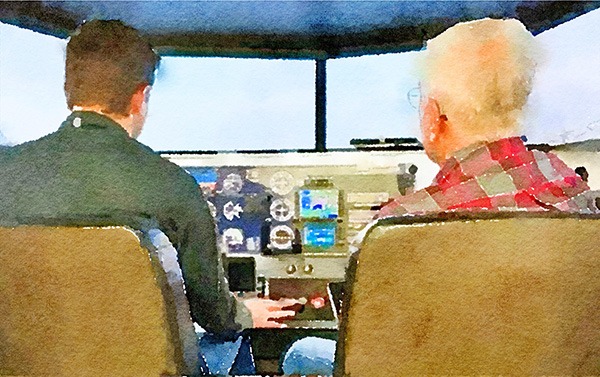
I hit the PAUSE button on the simulator. I need to think this over and talk with the more experienced pilot sitting next to me.
This is the sixth article in my series on The Basics of Flying.
For decades, flight simulators were viewed as the domain of the airlines and military training pipelines -large, hydraulic, full‑motion devices that sometimes cost more than the airplanes they replicated. General aviation (GA) pilots, by contrast, often saw simulation as a novelty, a desktop PC program for rainy days, or a tool (if available) used only during instrument training. That perception has changed dramatically.
Today’s simulators, ranging from FAA‑approved Advanced Aviation Training Devices (AATDs) to sophisticated home setups, have become indispensable devices for GA pilots who want to sharpen skills, maintain proficiency, reduce risk, and maximize their training dollars.
GA pilots now use simulation for everything from basic stick‑and‑rudder practice to advanced emergency scenarios that would be unsafe or impractical to attempt in an actual aircraft. As technology improves and costs fall, simulators are no longer supplemental; they are central to a modern GA pilot’s proficiency strategy.
My home airport, Middleton-Morey Field (C29), offers a Redbird Model SD flight simulator for an hourly rental rate. A CFI or CFII can be bundled for an additional hourly cost. The Redbird at Morey Field can be configured to replicate a Cessna 172S with a Garmin 430/530 stack, a Cessna 182S with a Garmin 430/530 stack, a Cessna 182RG with a Garmin G1000 EFIS, a Piper PA 28-161 with a Garmin 430/530 stack, or a Beech BE58 Baron with a Garmin G1000 EFIS.
Overall, the benefits of the simulator can be almost as good as flying a real aircraft, and at a lower cost. I have used the Redbird simulator several times over the past few years, mostly over the winter months. Admittedly, flying the Redbird will not push you back in your seat or make your stomach queasy, but the graphics (eight wrap-around screens), realistic model-specific panels and avionics, and computer graphic simulation, can effectively delude your brain into accepting the virtual reality created around you. In my humble opinion – the experience is well worth it.
This article explores how GA pilots can use flight simulators effectively across five major areas: basic flying skills, navigation, emergency and abnormal events training, avionics or aircraft‑specific familiarization, and the practical considerations of cost and time.
Building and Reinforcing Basic Flying Skills
Procedural Muscle Memory
One of the most underrated benefits of simulation is the ability to rehearse cockpit procedures without burning fuel or using expensive aircraft time. Even a modest home desktop simulator allows pilots to practice checklists, rehearse flows, build familiarity with avionics, and develop habit patterns for configuration changes.
These tasks may seem mundane, but they form the basis of safe flying. Repetition in a simulator helps pilots internalize these steps so that in the real aircraft, cognitive bandwidth is freed for situational awareness and decision‑making.
Attitude Flying and Scan Discipline
While no AATD or desktop simulator can perfectly replicate the feel of a real airplane, modern simulators do an excellent job teaching the visual and instrument cues associated with pitch, bank, and power.
Pilots can practice maintaining altitude and heading, instrument cross-checks, coordinated turns, climbs and descents, slow flight, and basic stalls (procedurally, not aerodynamically).
For student pilots, this repetition is invaluable. For experienced pilots, it is a way to stay sharp between flights, especially during winter months or periods of low flying activity.
Pattern Work and Workload Management
Simulators allow pilots to fly dozens of takeoffs and landings in a single session. While the “feel” of the flare may not be perfect, the simulated views out the windows are realistic enough and the cognitive elements of pattern work translate extremely well. Radio calls, spacing and sequencing, power settings, airspeeds, configuration (flaps and landing gear) timing, and stabilized approach criteria all allow the pilot to reinforce the routines necessary to fly safely and efficiently.
Pilots can also practice busy‑airport scenarios, including crowded traffic patterns, parallel runway operations, complex taxi routes, and ATC interactions, situations that are difficult to replicate consistently in real‑world flying.
Navigation and Cross‑Country Proficiency
VFR Navigation
Simulators excel at teaching and reinforcing navigation skills. Pilots can practice pilotage and dead reckoning, sectional chart interpretation, VOR navigation, terrain and airspace awareness, weather decision‑making, and diversion strategies. Simulators allow rapid repositioning, exploration of unfamiliar regions, mountain passes, and complex airspace without risk.
IFR Procedures and Currency
For instrument‑rated pilots, simulation is arguably the most powerful proficiency tool available. FAA‑approved devices allow pilots to log approaches, intercept and track courses, experience unusual attitude recovery (partial panel), and fly missed approaches and holds. In an AATD simulator, you can fly all the required procedures to maintain your IFR currency in a single simulator session. You can fly SIDs and STARs, and repeatedly fly approaches starting at the same IAF, allowing you to fly multiple approaches in a much shorter period.
Even non‑loggable home desktop simulators such as Microsoft Flight Simulator or X-Plane provide immense value. Pilots can practice loading, activating, and flying approaches, using GPS and autopilot modes, managing ATC clearances, and flying in challenging weather scenarios.
Because IFR flying is highly procedural, simulation is often more efficient than aircraft time for maintaining proficiency.
Avionics Mastery
Today, GA cockpits are increasingly dominated by glass panels, such as the Avidyne Entegra series, Garmin G1000, Garmin G3X, Dynon SkyView, Aspen Evolution, and others. Simulators allow pilots to learn buttonology, practice flight plan entry, explore autopilot modes, and understand system logic and failure modes.
This reduces cockpit workload dramatically and helps prevent common errors such as incorrect mode selection, mis‑sequenced approaches, or automation over‑reliance. You can repeatedly practice adding and deleting waypoints, holding procedures, and amending clearances, in a more controlled, less hectic, and lower-stress cockpit environment.
I never had a Garmin 430/530 stack in my airplane (I use the Garmin GNC 355). However, I learned the 430/530 buttonology through both my Microsoft Flight Simulator and the Redbird simulator. I am also starting to familiarize myself with the Garmin G1000.
Garmin also offers several GPS aviation trainer apps, downloadable for free, through the App stores. The GPS trainer apps realistically simulate the capabilities and user interface of Garmin’s GPS 175, GNC 355 and GNX 375 navigators, so you can train like it is the real thing, but from your iPad or tablet. You can also select among the GPS 175, GNC 355, or GNX 375 to experience the specific features each model offers. These trainers also come with a basic autopilot, so you can select speeds, altitudes, and navigation modes.
YouTube introductory videos can also save you time, even before sitting down at a simulator or using a trainer app, for familiarization purposes with many of the popular avionics’ models.
Note: While simulators and trainer apps can replicate many of the features of real avionics, they do not model all functionalities.
Emergency and Abnormal Event Training
Scenarios Too Dangerous for Real‑World Practice
One of the greatest strengths of simulation is the ability to safely practice emergencies and abnormal events that would be hazardous or difficult to attempt in an aircraft. These include:
- Engine failures at various altitudes
- Electrical failures
- Vacuum system failures
- Pitot‑static malfunctions
- Autopilot or trim runaway
- Inadvertent IMC encounters
- Spatial disorientation scenarios
- Encounters with ice
Pilots can repeat these situations multiple times, exploring different decisions and outcomes.
There are very few new ways for pilots to kill themselves. They mostly continue to rely on the old ways. I have heard it said, “All pilots make mistakes. The trick is not to make the mistake that will kill you.”
Three often fatal GA scenarios that can be practiced safely in the simulator are messed-up go-arounds, failing to fly at Defined Minimum Maneuvering Speed (DMMS) and Vref speeds in the traffic pattern, and flying in IMC, at night, in mountainous terrain, or in ice.
Decision‑Making Under Pressure
Simulators allow instructors to introduce cascading failures or unexpected complications. For example, an engine failure followed by a radio failure, a missed approach leading to a fuel emergency, or a weather diversion resulting from a line of thunderstorms.
These scenarios build resilience, condition correct responses, and reinforce the importance of staying ahead of the airplane.
Upset Prevention and Recovery
While desktop simulators and AATD simulators cannot replicate G‑forces, they can teach recognition of developing abnormal events, proper control inputs, avoidance of over‑control, and recovery from unusual attitudes. This is especially valuable for pilots transitioning to faster or more complex aircraft.
Aircraft‑Specific Training and Transition Scenarios
Learning a New Aircraft
Whether transitioning from a Cessna 172 to a Cirrus SR22, or from a Piper Archer to a piston twin, simulators help pilots learn systems, avionics, performance characteristics, normal and emergency procedures, and checklist flows. Many AATDs replicate specific aircraft models with high fidelity, including flight attributes, engine behavior, propeller and mixture effects, flap and gear operation, and autopilot integration. This allows pilots to arrive at the real airplane with a strong procedural foundation.
High‑Performance and Complex Aircraft
Simulators are particularly useful for retractable gear procedures, constant‑speed propeller management, turbocharged engine operations, pressurization systems, and high‑altitude operations. Practicing these systems in a simulator reduces the risk of costly mistakes in the aircraft.
Glass Cockpit Transitions
For pilots moving from steam gauges to glass, simulation is often the most efficient way to learn PFD/MFD symbology, synthetic vision, flight director cues, autopilot integration, and VNAV and LPV approaches.
This training dramatically improves safety, as many GA accidents involve loss of control or automation mismanagement/misunderstanding during transitions.
Costs, Time Efficiency, and Practical Considerations
Cost Savings
Flight simulators offer one of the best returns on investment in aviation training. Consider the typical (estimated) hourly costs:
Training Method Typical Cost per Hour Notes Rental Cessna 172 $125–$200 Plus fuel surcharges in some regions Rental Cirrus SR22 $300–$500 High‑performance aircraft Instructor Fee $50–$90 Added to aircraft rental AATD Simulator $40–$80 Often loggable for IFR Home Simulator $0 after acquisition Unlimited practice
A pilot who uses simulation effectively can reduce aircraft rental hours, especially during instrument training or avionics/aircraft transition.
Time Efficiency
Simulators eliminate many time‑consuming elements of real‑world flying, including preflight inspections, taxi time, waiting for clearances, weather delays, fueling, and maintenance downtime.
A pilot can practice six approaches in 45 – 60 minutes, something that might take two hours or more in a real aircraft.
Accessibility and Flexibility
Simulators allow pilots to train at night, during bad weather, during maintenance downtime, or when travel or schedules limit flying opportunities. This consistency is crucial for maintaining proficiency, especially for instrument pilots.
Limitations
Simulators are powerful, but not perfect. They cannot fully replicate control feel, seat‑of‑the‑pants sensations, real‑world turbulence, crosswind/gusty landing dynamics, and the psychological pressures of actual flight.
Interestingly, I understand the FAA requires that AATD simulators be programmed with more sensitive flight controls than a real aircraft. I have encountered this as well. I have also witnessed very experienced pilots flying an AATD simulator for the first time struggle with control sensitivity, particularly on takeoffs and landings.
Because computer hardware and software drive the simulation graphics and controls, there may be a learning curve associated with use. If you are a first-time or infrequent user, I recommend that you have a more experienced user to assist with initial startup, flight setups, and acclimation.
Pilots should view simulation as a complement to, not a replacement for, aircraft time.
Best Practices for Effective Simulator Use
To get the most value from simulation, pilots should approach it with structure and intention.
Set Clear Objectives
Each session should have a defined purpose, such as “Simulate an engine failure after takeoff,”
“Practice three RNAV approaches with missed approaches and holds,” or “Rehearse G1000 flight plan entry.”
Use Real Checklists and Flows
Treat the simulator like a real airplane; use the same written checklists, follow the same procedural callouts, and maintain the same cockpit discipline. This builds transferable habits.
Debrief Thoroughly
After each session, review performance, analyze decision‑making, and identify areas for improvement. Many simulators allow replay and data analysis, which enhances learning.
Integrate with Real‑World Flying
Simulation should reinforce, not replace, aircraft experience.
A balanced approach might include periodic simulator sessions for IFR proficiency, pre‑flight rehearsal before long cross‑countries, and emergency scenario practice. I have used Microsoft Flight Simulator to “pre-fly” the arrival and landing at unfamiliar airports. The simulation is realistic enough to provide a good sense of airport and runway layouts from the air, identifiable landmarks, and terrain and obstructions.
Flight simulators have evolved from unusual into essential components of general aviation training. They offer unmatched opportunities to build skills, practice procedures, and condition responses for emergencies, all at a fraction of the cost and risk of real‑world flying. Whether a pilot is learning basic stick‑and‑rudder skills, mastering complex avionics, preparing for an aircraft transition, or sharpening IFR proficiency, simulation provides a safe, efficient, and highly effective training environment.
In an era where safety, proficiency, and cost‑effectiveness matter more than ever, simulators enable GA pilots to fly smarter, safer, and with greater confidence. Today, simulators are no longer optional; they are essential to modern airmanship.
Note: The EAA Pilot Proficiency Center, located adjacent to the EAA Aviation Museum in Oshkosh, WI, offers 12 FAA-certified Redbird LD AATD simulators and instructional staff to make you a safer pilot. See https://www.eaa.org/eaa/pilots/eaa-pilot-proficiency/about-pilot-proficiency-center.
© Copyright Dean Zakos 2026 All Rights Reserved
DISCLAIMER: Mr. Zakos’s articles should not be used for flight training or misconstrued as instructional material. The articles represent the author’s personal opinions. Readers are urged to always consult with a Certified Flight Instructor and other sources about anything discussed herein.
